
Overview
Custom role permissions define the granular actions and access rights assigned to custom roles in Manor. By configuring permissions at the individual capability level, administrators can ensure that team members have access only to the modules and data relevant to their responsibilities (adhering to the principle of least privilege).
For full step-by-step instructions on creating, editing, assigning, and deleting custom roles, see the authoritative guide:
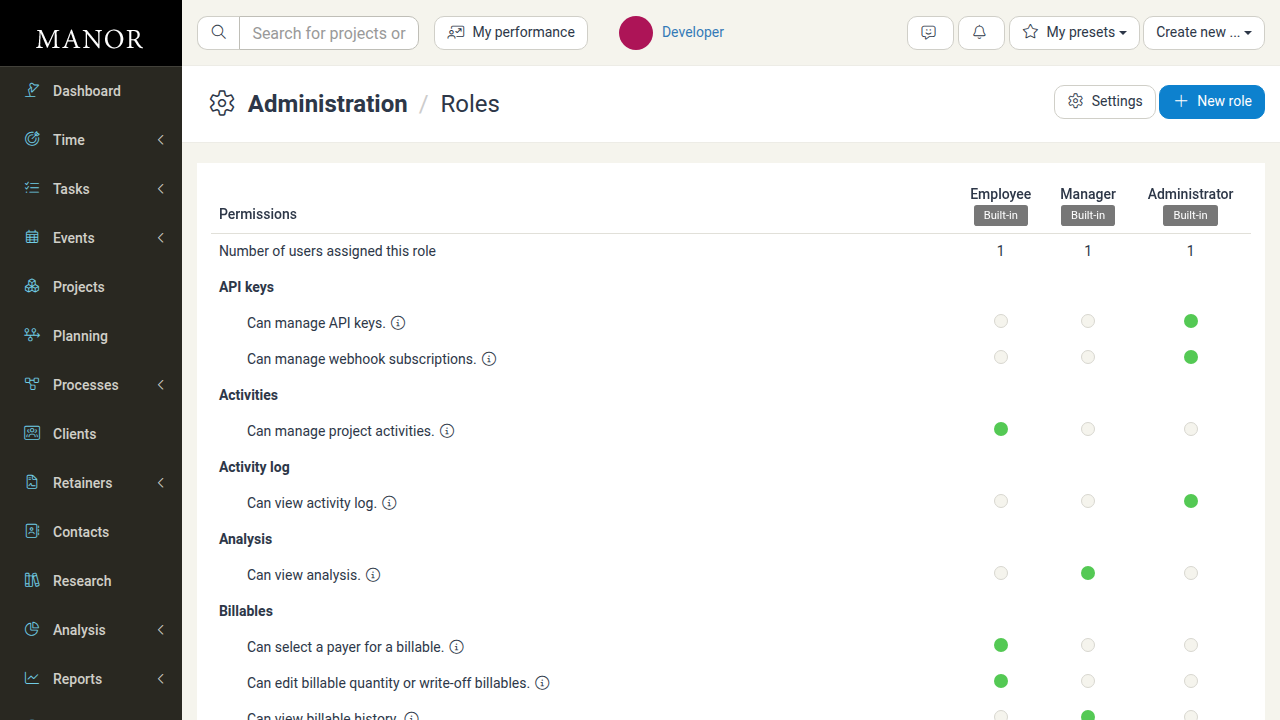
Permission Categories & Capabilities
Permissions are organized alphabetically into functional modules within the Roles permissions matrix and role creation/edit dialog:
| Category | Capability / Permission | Description & Scope |
|---|---|---|
| API keys | Can manage API keys. | Allows access to the API keys administration area to create, revoke, and update API keys. |
| Can manage webhook subscriptions. | Allows system users to create webhook subscriptions through the API. | |
| Activities | Can manage project activities. | Allows a user to create, view, edit, and delete activities within any accessible project. |
| Activity log | Can view activity log. | Grants access to the Activity Log in Administration where activity by all users is audited. |
| Analysis | Can view analysis. | Allows viewing multiple analysis reports covering data across all projects. |
| Billables | Can select a payer for a billable. | Allows selecting a specific payer on time, travel, expense, product, and per diem entries. |
| Can edit billable quantity or write-off billables. | Allows setting a billable quantity distinct from logged quantity, or marking an entry written-off. | |
| Can view billable history. | Allows seeing the audit history of edits to an entry. | |
| Can edit entries already processed in payroll. | Allows editing time, travel, and per diem entries that have already been locked into a payroll batch. | |
| Bundles | Can manage bundles. | Allows creating, viewing, editing, and deleting own bundles and bundles of other users in projects where the user is a full-access participant. |
| Clients | Can create clients. | Allows creating new client records. |
| Can view clients. | Allows seeing client lists and viewing client properties. | |
| Can edit clients. | Allows modifying all properties of existing clients. | |
| Can delete clients. | Allows deleting client records. | |
| Contacts | Can manage contacts. | Allows creating, viewing, editing, and deleting contacts. |
| Containers | Can manage containers. | Allows managing containers in the physical storage area. |
| Currencies | Can manage currencies. | Allows creating, viewing, editing, and deleting currencies in the pricing area. |
| Dashboard | Can view the dashboard. | Allows access to view the main Dashboard. |
| Data | Can view data table pages. | Grants access to the Data area containing raw data tables across accessible projects. |
| Departments | Can manage departments. | Allows creating, viewing, editing, and deleting organizational departments. |
| Events | Can manage events. | Allows creating, viewing, editing, and deleting any calendar event from any user. |
| Can manage events as participant. | Allows creating, viewing, editing, and deleting own events and events within projects as a full-access participant. | |
| Expenses | Can create expenses. | Allows creating expense entries. |
| Can view expenses. | Allows viewing own expenses and expenses in projects as a full-access participant. | |
| Can edit expenses. | Allows editing own expenses and expenses in projects as a full-access participant. | |
| Can delete expenses. | Allows deleting own expenses and expenses in projects as a full-access participant. | |
| Can select user in expense entries. | Allows setting or changing the user attribute on expense entries. | |
| Imports | Can manage imports. | Allows creating, viewing, editing, and deleting imported data batches in Management. |
| Integrations | Can manage integrations. | Allows enabling and disabling third-party integrations in Administration. |
| Invoices | Can create invoices in all projects. | Allows creating invoices across all projects regardless of participation. |
| Can create invoices as project owner. | Allows creating invoices if designated as the project billing owner. | |
| Can view invoices as project owner. | Allows viewing invoices and files if designated as the project billing owner. | |
| Can view all invoices. | Allows viewing all invoices and invoice files across the firm. | |
| Can delete invoices or create credit invoices. | Allows deleting invoices (if non-accounting primary) or generating credit notes. | |
| Can manage invoice proposals in all projects. | Allows full management of draft proposals across all projects. | |
| Can manage invoice proposals as project owner. | Allows managing proposals for projects where the user is the project owner. | |
| Can monitor invoice delivery. | Allows viewing electronic invoice dispatch and delivery status. | |
| Can delete or credit their own invoices. | Allows users to delete or credit invoices that they personally created. | |
| Labels | Can manage labels. | Allows creating, viewing, editing, and deleting labels in Management. |
| Levels | Can manage organizational levels. | Allows managing organizational tier levels in Management. |
| Locations | Can manage locations. | Allows managing office or work locations in Management. |
| Notes | Can manage notes. | Allows creating, viewing, editing, and deleting project notes as a full participant. |
| OData | Can access Odata API. | Allows querying system data via the OData API. |
| Pay periods | Can manage payroll. | Grants full access to payroll periods, settings, and all payroll data across firms. |
| Can manage payroll within own firm. | Allows payroll management scoped specifically to the user's firm. | |
| Can access payroll analysis. | Allows viewing reports listing underlying payroll quantities. | |
| Can access payroll analysis as a department manager. | Scopes payroll analysis reports to managed departments and their users. | |
| Can confirm hours as a firm or department manager. | Allows confirming time entries for payroll for users within managed departments. | |
| Per diems | Can manage per diems. | Allows creating, viewing, editing, and deleting own and project per diem allowances. |
| Can select user in per-diem entries. | Allows setting or reassigning the user on per diem entries. | |
| Planning | Can access planning for all users. | Allows operating the resource planner across all firms and departments. |
| Can access planning as department manager. | Allows operating the resource planner within managed departments. | |
| Can access planning as department member. | Scopes resource planner visibility to the user's own department. | |
| Prices | Can view prices. | Allows viewing monetary rates and totals in participating projects. |
| Can change prices in all projects and for all clients. | Allows modifying rate prices and discounts across all clients and projects. | |
| Can change project prices as project owner. | Allows modifying rate prices and discounts as project manager. | |
| Can change project prices as billing owner. | Allows modifying rate prices and discounts as the project billing owner. | |
| Processes | Can manage processes. | Allows creating, viewing, editing, and deleting workflows in Processes. |
| Products | Can manage products. | Allows creating, editing, viewing, and deleting product entries. |
| Project management | Can view project management. | Grants access to the global project management overview. |
| Assets | Can manage assets. | Allows creating, viewing, editing, and deleting assets. |
| Projects | Can create projects. | Allows creating new projects. |
| Can view all projects excluding confidential. | Allows viewing all non-confidential projects firm-wide. | |
| Can view projects as participant (any participant). | Scopes project visibility to projects where the user is an assigned participant. | |
| Can edit projects. | Allows editing any project the user has access to. | |
| Can edit projects as participant (full access participant). | Allows editing project details when assigned as a full participant. | |
| Can delete projects. | Allows deleting any accessible project. | |
| Can delete projects as participant (full access participant). | Allows deleting a project if assigned as a full participant. | |
| Can view project files. | Grants access to project documents and storage. | |
| Can create billables in any project. | Allows logging entries to any project regardless of participation or visibility. | |
| Can view cost price as project owner. | Allows viewing cost prices and margins on owned projects. | |
| Can view cost price in any project. | Allows viewing cost prices and margins across all accessible projects. | |
| Can view billables of sensitive internal projects. | Allows viewing other users' entries in sensitive internal projects. | |
| Can view billables of sensitive internal projects as a department manager. | Scopes sensitive project entry visibility to managed department members. | |
| Can view confidential projects. | Grants permission to view projects flagged as confidential. | |
| Can be a project owner. | Qualifies the user to be selected as a project owner. | |
| Can edit project billing type. | Allows switching billing arrangements on a project. | |
| Qualifications | Can manage qualifications. | Allows configuring employee qualifications in Management. |
| Rates | Can view published prices. | Allows viewing published rate cards and price reports. |
| Can manage rates. | Allows configuring rates, pricing periods, and rate categories in Management. | |
| Reports | Can view contractor report. | Allows subcontractors to access summary reports of their billables. |
| Research | Can manage research document copies. | Allows managing research entries and document copies in projects. |
| Retainers | Can manage retainers. | Allows creating, viewing, editing, and deleting retainer agreements. |
| Roles | Can manage custom roles. | Allows creating, editing, and deleting custom roles in Administration. |
| Service portal users | Can manage service portal. | Allows managing external client service portal user accounts and access. |
| Settings | Can manage settings. | Allows editing all settings across Management and contextual settings pages. |
| Can control own firm. | Restricts firm setting modifications strictly to the user's home firm. | |
| Tasks | Can manage task as participant. | Allows task management within projects as a full participant. |
| Can manage tasks. | Allows general task management within assigned projects. | |
| Templates | Can manage templates. | Allows creating, viewing, editing, and deleting system templates in Management. |
| Time | Can manage their own time entries. | Allows logging and managing personal time, and viewing/editing time in owned projects. |
| Can edit time entries for others. | Allows viewing and editing time entries logged by other users. | |
| Can edit time entries for others as a department manager. | Allows editing time entries for users belonging to managed departments. | |
| Can change user, date and duration in time entries. | Grants power to reassign ownership, change dates, and alter durations on time entries. | |
| Travels | Can create travels. | Allows logging travel distance and expense entries. |
| Can view travels. | Allows viewing personal travels and project travels as a full participant. | |
| Can edit travels. | Allows modifying travel records as an owner or full participant. | |
| Can select user in travel entries. | Allows specifying or changing the user attribute on travel entries. | |
| Users | Can manage users. | Grants administrative control to create, view, edit, and deactivate users. |
| VAT rates | Can manage VAT rates. | Allows creating, viewing, editing, and deleting VAT rates in Management. |
| Vacation requests | Can view vacation overview. | Allows viewing global vacation requests and approved leave. |
| Can view vacation overview as department manager. | Scopes vacation overview to managed department members. | |
| Can manage vacation requests. | Allows approving, rejecting, and editing all vacation requests firm-wide. | |
| Can manage vacation requests as department manager. | Allows approving and rejecting vacation requests for managed department staff. |
Note: The Can confirm hours as a firm or department manager permission grants the manager bulk-confirm action for employee hours on the Payroll Confirmations page. The underlying manager hour confirmation feature itself must be enabled at deploy time by your Manor hosting partner or administrator — it cannot be switched on from within Manor.
Built-in Roles vs. Custom Roles
In the Manor matrix header, three standard built-in roles are displayed alongside custom roles:
- Employee: Default standard role with permissions focused on personal time tracking, basic project tasks, and assigned activities.
- Manager: Mid-tier operational role with broader review, planning, and department management rights.
- Administrator: Full administrative role granting virtually all permissions across firm configuration, user administration, and financial oversight.
Built-in roles are marked with a Built-in badge and cannot be modified or deleted. To grant non-standard permissions, create a custom role.
Configuring Permissions
- Navigate to Administration → Roles.
- Click New role to create a role, or click the edit link next to an existing custom role in the matrix header.
- Supply a role Name and check or uncheck individual permission checkboxes across each functional category.
- Click Save (or Save role) to apply permission updates immediately.
Note: No role has any vacation permission enabled out of the box, so an administrator must grant them manually. Until then, the entire Vacation area — vacation requests, the vacation overview, and the manager vacation view — stays hidden for users with that role. The permissions to grant are Can manage vacation requests, Can manage vacation requests as department manager, Can view vacation overview, and Can view vacation overview as department manager.
Key Considerations
- Principle of Least Privilege: Grant only permissions strictly required for each team member's role.
- Role Assignment: Permissions take effect immediately once a role is assigned to a user in Administration → Users.
- Role Deletion Safety: A custom role cannot be deleted while users remain assigned to it. Reassign assigned users before deleting.
Related Topics
- Custom Roles — Step-by-step guide to role administration
- User Roles — Built-in roles overview
- Users — Assigning roles to users