
Overview
The Microsoft Teams integration connects Manor to Microsoft Teams to automatically suggest time entries for client and internal calls. Using Microsoft Graph client credentials and webhook subscriptions, Manor listens for new call records, extracts call duration and participant details, and creates automated time suggestions (beats) for the caller in Manor.
Key benefits of integrating Microsoft Teams include:
- Automated Call Capture: Eliminates the need to manually track or remember call start times and durations.
- Accurate Time Suggestions: Converts completed Teams calls into reviewable revenue beats in the caller's Day view.
- Firm-Level Configuration: Managed centrally per firm under firm settings, without requiring individual user OAuth credentials for calls.
- Automatic Webhook Maintenance: Microsoft Graph webhook subscriptions expire every 71 hours and are automatically renewed by Manor in the background.
How It Works
- Call Completion: When a user completes a call or meeting in Microsoft Teams, Microsoft Graph generates a call record event.
- Webhook Notification: Microsoft Graph notifies Manor's webhook endpoint using application-level client credentials.
- Data Extraction: Manor fetches the call record details, including caller identity, start time, end time, and duration.
- Beat Creation: Manor creates a suggested time entry (beat) in the caller's Day calendar view (
/time/day). - Review & Convert: The user reviews the beat in Manor, links it to the appropriate client project, and converts it into a confirmed billable time entry.
Prerequisites in Microsoft Entra ID (Azure)
Before configuring the integration in Manor, an administrator must register an application in the Microsoft Entra ID admin center (formerly Azure Active Directory):
-
Register an Application:
- In Microsoft Entra ID, navigate to App registrations → New registration.
- Enter an application name (e.g.,
Manor Teams Integration). - Under Supported account types, select Accounts in this organizational directory only (single tenant).
- Click Register.
-
Copy Application Identifiers:
- On the application Overview page, copy and record:
- Directory (tenant) ID
- Application (client) ID
- On the application Overview page, copy and record:
-
Configure API Permissions:
- Go to API permissions → Add a permission.
- Select Microsoft Graph → Application permissions.
- Search for and select
CallRecords.Read.All. - Click Add permissions.
- Click Grant admin consent for [your tenant] and confirm.
-
Generate Client Secret:
- Navigate to Certificates & secrets → Client secrets → New client secret.
- Provide a description and choose an expiration period.
- Click Add and immediately copy the secret Value (it will not be shown again).
Enabling and Managing the Integration in Manor
Viewing Integration Status
To check the integration status:
- Navigate to Administration in the main navigation menu.
- Click Integrations (or go to
/administration/integration). - Under the Firm integrations section, click Microsoft Teams (
/administration/integration/microsoft-teams).
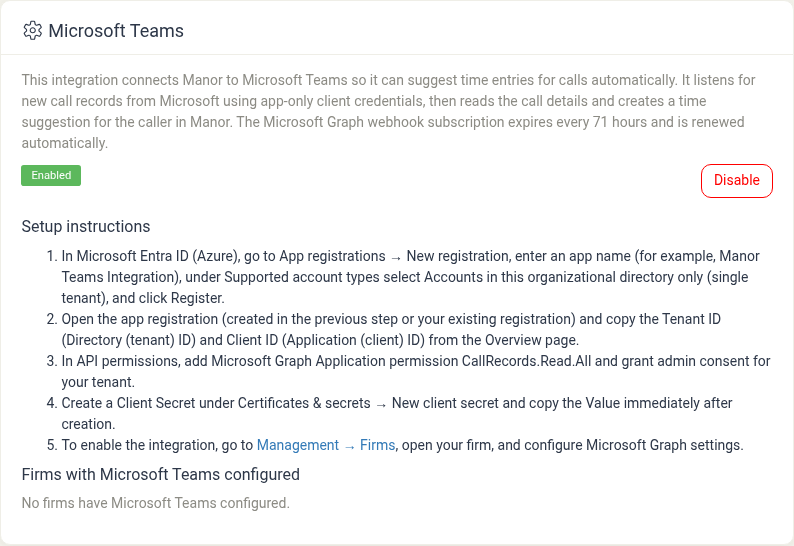
From this screen, administrators can:
- Review integration details and active status.
- Enable or disable the integration globally across the firm.
- Review step-by-step setup instructions.
- See which firms currently have Microsoft Teams configured.
Enabling or Disabling
- Click Disable to pause Teams call record ingestion across all firms.
- Click Enable to activate the integration service.
Configuring Firm Settings
Once the integration is enabled in Administration:
- Navigate to Management → Firms (
/management/firm). - Select your firm to edit its settings.
- Locate the Microsoft Graph / Teams configuration section.
- Enter the Tenant ID, Client ID, and Client Secret obtained from Microsoft Entra ID.
- Save the firm configuration.
Manor will establish the Microsoft Graph webhook subscription and automatically begin receiving call records.
Best Practices
- Review Teams Beats Daily: Check the Day view (
Time > Day) regularly to convert Teams call beats while meeting context is fresh. - Maintain Entra ID Secrets: Track the expiration date of your Azure client secret and renew it prior to expiry to prevent interruptions in call logging.
- Ensure Email Matching: Team members in Manor should have email addresses matching their Microsoft 365 / Entra ID user principal names (UPN) so incoming call records match the correct user profile.
Related Articles
- Integrations — System and firm integration overview in Administration.
- Beats — Reviewing and converting automated time suggestions.
- Calendar Sync — Connecting personal calendar services.
- Profile Integrations — User-level personal integrations.