
What is the Data Section?
The Data section is your central hub for managing all the information in Manor — from billable work items like time entries and travel, to foundational records like projects, clients, tasks, and events. It provides quick access to every type of record you create and manage in the system.
Think of Data as the filing cabinet for your firm. While other sections like Time and Projects let you work with data, the Data section gives you a unified view where you can browse, search, filter, and manage all your records in one place.
Accessing Data
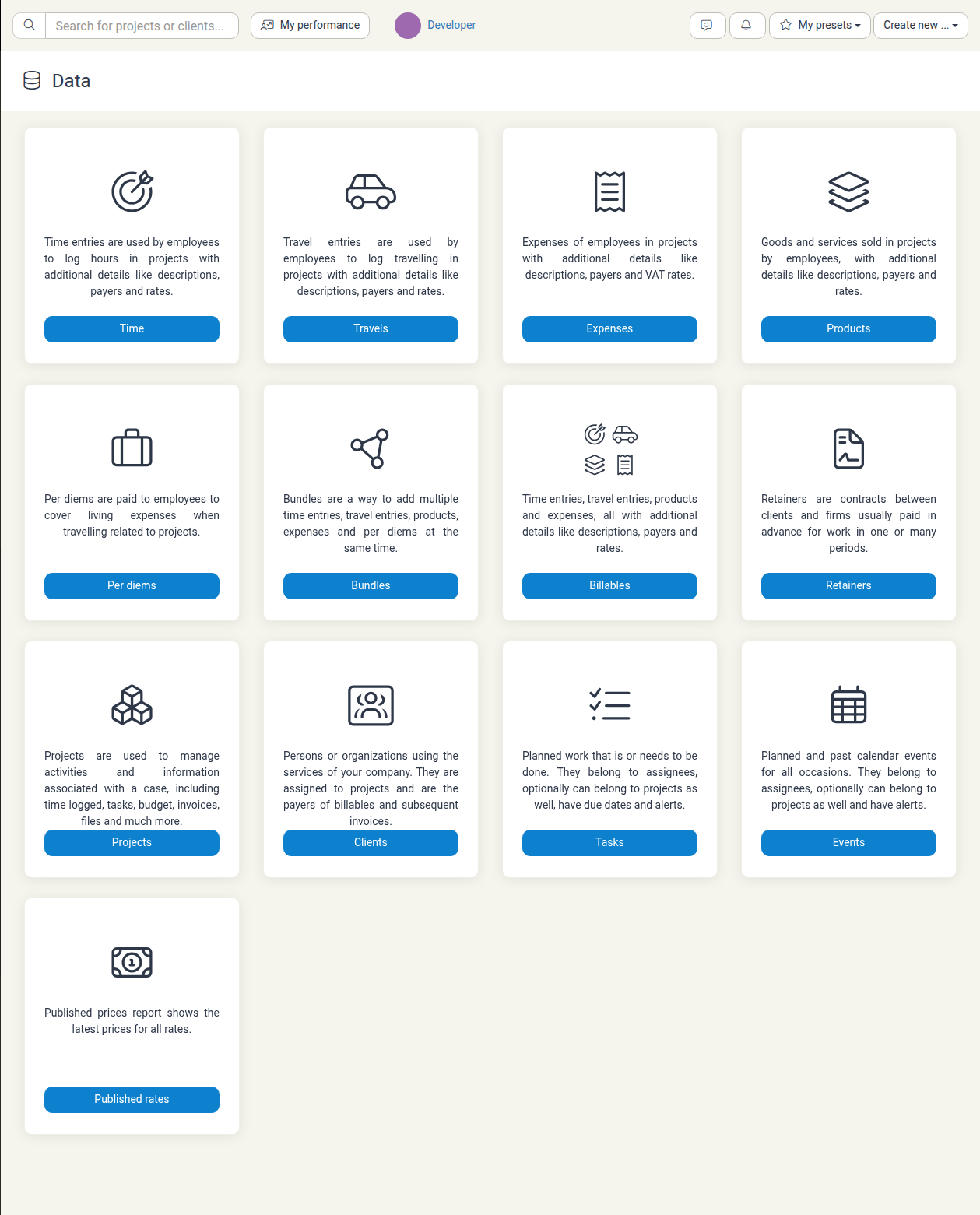
Click Data in the main navigation. The overview page lists every data type as a card in a single grid, each with a short description and a button that opens that table. The cards appear in this order:
- Time — time entries employees log in projects
- Travels — travel entries employees log in projects
- Expenses — employee expenses in projects
- Products — goods and services sold in projects
- Per diems — daily allowances paid to employees travelling for projects
- Bundles — add multiple time entries, travel entries, products, expenses, and per diems at the same time
- Billables — all billable items (time, travel, products, and expenses) in one list
- Retainers — pre-paid contracts with clients
- Projects — cases and the work associated with them
- Clients — persons or organizations you serve
- Tasks — planned work with due dates and alerts
- Events — planned and past calendar events
- Published rates — the latest prices for all rates
Use the Data submenu in the navigation to jump straight to any of these tables.
Understanding Data Types
Billable Work
These are the items you log to projects and bill to clients:
| Type | What it is | Use for |
|---|---|---|
| Time | Hours worked by employees | Tracking billable time on projects |
| Travels | Travel time and transportation | Recording travel costs and hours |
| Expenses | Out-of-pocket costs | Recording employee expenses |
| Products | Goods and services sold | Billing for items sold or delivered |
| Per diems | Daily allowances while traveling | Covering living expenses during travel |
| Bundles | Groups of multiple billables | Adding multiple items at once |
Overview Records
These are your core business records:
| Type | What it is | What you can do |
|---|---|---|
| Billables | Unified view of all billable work | Search, filter, and manage all billable items across time, travel, expenses, and products |
| Retainers | Advance contracts with clients | Track recurring billing arrangements with clients |
| Projects | Cases, matters, or engagements | Manage all work associated with a specific client matter |
| Clients | Organizations or persons you serve | Track client information and billing details |
| Tasks | Work items assigned to team members | Manage to-do items and action items |
| Events | Calendar entries and meetings | Schedule and track appointments and events |
Reference
| Type | What it is |
|---|---|
| Published rates | Current pricing for all billing rates |
Viewing Data in Tables
Each data type displays records in a table format, making it easy to:
- Search — Use the search field to find specific records
- Filter — Narrow records by date, status, or other criteria
- Sort — Click column headers to organize records
- Export — Download data as a spreadsheet for external use
Why Use the Data Section?
- Find records quickly — Instead of navigating through projects or clients, go directly to the record type you need
- Bulk operations — See all records of one type together to identify patterns or issues
- Reporting — Get a complete inventory of what's in your system
- Audit — Review all entries for a particular type to ensure accuracy and completeness
Best Practices
Use Data for reference, not for primary entry
While you can view and manage records here, it's usually easier to create items where they're used (time in the Time section, tasks in Tasks, etc.). Use Data when you need to review or audit what you've already created.
Check Published Rates regularly
Keep your team informed about the latest billing rates by reviewing Published rates and sharing updates with your team.
Export data before sharing
If you need to share a list of records with colleagues, use the Export function to download a spreadsheet. It's cleaner and more portable than screenshots.
Combine with Analysis for insights
Use Analysis (not Data) when you want to understand patterns in your billable work — revenue trends, utilization rates, and departmental performance. Data shows you the individual records; Analysis shows you what they mean.
Related Sections
- Time Tracking — Log and track billable time
- Analysis — View revenue and billable hour breakdowns
- Billing — Manage invoices and payments
- Projects — See the full context of work on a specific case
See Also
Individual record types in the Data section each have their own article:
- Analysis — Revenue accrued, revenue billed, and time analysis
- Data Analysis Guide — Detailed guide to the Analysis views
- Billables — Unified view of all billable items
- Clients (Data) — Firm-wide client records
- Events (Data) — All events in a filterable table
- Expenses (Data) — All expense entries
- Per Diems (Data) — All per diem entries
- Products — All product entries
- Projects (Data) — Firm-wide project inventory and bulk actions
- Published Rates — Latest prices for all rates
- Retainers (Data) — All retainer records
- Tasks (Data) — All tasks in a filterable table
- Time Entries — All logged time
- Travel Entries — All travel entries
- Editing Records — How to open, change, and save records, and how defaults and placeholders work
- Activity log and audit requests — Confirm exactly what changed on a record