
What is the Project Number Series?
Every project in Manor gets a number (the Project number, sometimes called the matter number). It is a simple, sequential figure that uniquely identifies the project. Understanding how these numbers are produced — and what you can and cannot change about them — helps you plan how project references work in your firm, especially when you are moving work over from another system.
This article covers:
- How Manor assigns project numbers by default.
- Whether you can give project numbers your own prefix, suffix, starting number or increment.
- How to arrange your own number series for your firm.
- How the automatic project number relates to the separate External project number field.
- What the resulting project numbers look like.
Tip: To switch on and use the optional External project number field, which stores an additional reference number on each project, see External Project Number. The section below is a short summary only.
How Manor Numbers Projects
Manor assigns project numbers automatically, in ascending order, by one. The first project in a fresh Manor is number 1, the next is number 2, and so on. The number is assigned for you when the project is saved: you cannot set it in advance, and Manor does not show a preview of the next number while you are filling in the form.
A few rules govern project numbers:
- You do not choose the number. When you create a project, there is no field where you pick a number — Manor allocates the next available one.
- You cannot change the number. The New project and Edit project dialogs contain no field for it, and once assigned a project's number is fixed.
- Numbers are never reused. If a project is deleted, its number is retained and is never given to another project.
- Numbers can have gaps. The sequence is shared with other records, such as the internal projects Manor creates for internal settlement, so a number can be taken between two of your own projects. The numbers you see are always unique and in ascending order, but they are not necessarily consecutive.
These rules keep project identification unambiguous: a number always points to one specific piece of work, forever.
Where the Number Appears
- On the project page, as Project number in the Project properties panel.
- In the Projects list and in the Projects (Data) view, as the No. column.
- Appended in brackets to the project name in lists, page titles and breadcrumbs — for example Acme Corp - Trademark Registration (1).

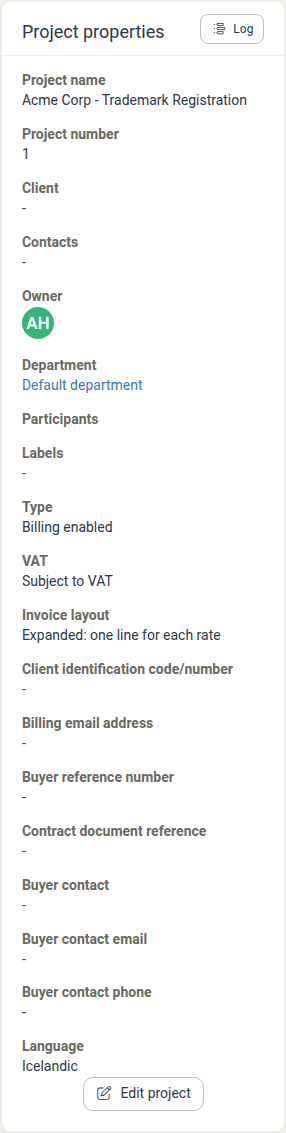
See the Projects and Projects (Data) articles for how numbers appear across the portfolio and in exports.
Can I Use My Own Number Series?
There is no self-service setting in Manor where you type a prefix, suffix, starting number or increment to build a project number format. Project numbers are always the plain sequential integers described above, and there is no screen on which you can define a pattern such as 22-001 or R22-001.
The Project settings group under Management → Settings does not generate project numbers at all. Its three Project number settings (Project number on client-facing documents, Project number in search and Project number in tables and reports) only choose which number is displayed in each context — they do not build or restart a series. There is no setting for a number series anywhere in Management or Administration.
That said, you can use your own number series. Many firms arrive from an older matter-management system that already had an established numbering convention, and they want the sequence to continue seamlessly in Manor. This is not something you carry out inside the application.
To obtain a custom number series — for example a specific starting point, a prefix, or a series that continues the numbering from your previous system — you must contact Manor (the partner who hosts your instance). Manor arranges it for your firm; it cannot be configured by an administrator from the settings screens.
Tip: Because Manor lets you record and filter by almost any data on a project, the older reasons for encoding information inside the number (such as the year,
22-001, or the work type,R22-001) are usually no longer necessary. A plain, sequential number plus labels, custom fields or the External project number below covers the same needs and is easier to search.
Storing Your Own Reference Numbers: External Project Number
If what you need is a place to record another number on each project — for example a number from a parallel system, a physical document box number, a case number from an authority, or a convention such as 22-001 — Manor provides the External project number field. This field is free text, so you can enter anything into it, including letters, digits and separators.
The field is switched on once for the whole instance by an administrator under Management → Settings → Project settings (Enable external identifier, plus a label such as External project number). Once on, the field appears on the project form and as a column in project lists, is searchable, and can be filled in by anyone who can edit the project.
In that same Project settings group, setting Project number on client-facing documents, Project number in search or Project number in tables and reports to External identifier makes your own number appear instead of Manor's sequential number in that context. This is the supported way to display your own numbering, and it changes only what is displayed — never how the Manor number is generated.
The two numbers are independent: a project always has a Manor project number, whether or not it also has an external number, and entering an external number never changes the Manor number.

Full instructions — how to enable it, where it appears, who can edit it, and how it relates to billing and search — are in External Project Number.
Examples of Resulting Project Numbers
Because the automatic series is a plain integer sequence, and the external number is whatever you type, the two behave quite differently:
| Situation | Automatic Project number | External project number (user-entered) |
|---|---|---|
| First project in a fresh Manor | 1 |
(empty unless you fill it in) |
| Third project | 3 |
BOX-00231 |
| Reference to an authority case | 1042 |
2026/4481 |
| Continuing an old system's convention | (a plain number; a matching series is arranged with Manor) | 22-001 |
The automatic number is always a bare integer; any prefix, suffix or code you see comes either from a series Manor has configured for you or from the external number you entered yourself.
If your requirement is a different automatic format (a prefix, a suffix, a particular starting number, or a different step), that is the "own number series" scenario described above and it is arranged with Manor, not configured in the settings screens.
Related Articles
- External Project Number — Enabling, labelling and using the optional External project number field.
- Project Creation — Creating a project and working with Advanced project properties, where the External project number field appears.
- Projects — The portfolio list, including the No. column and how to filter and search projects.
- Projects (Data) — The firm-wide data view and export of project records.
- Custom Fields — Adding structured extra data to projects via templates.
- Labels — Grouping and reporting projects by category.
- Global Settings — Where the Project settings group (including the external identifier) lives.
- Firms — Firm-level settings and invoicing configuration.