
What are Per Diem Entries?
Per diem entries track daily living allowances for travel-related expenses like meals and lodging. They provide a standard way to reimburse employees for daily costs during business travel, separate from actual receipts.
Why Per Diem Matters
Tracking per diem helps you:
- Reimburse fairly - Provide standard daily allowances
- Simplify expense tracking - Don't need individual meal receipts
- Track travel costs - Include daily allowances in project expenses
- Comply with policies - Follow company travel reimbursement rules
- Bill accurately - Charge travel allowances to appropriate projects
Creating a Per Diem Entry
To create a new per diem entry:
-
Navigate to the project for this travel.
-
Click the + Per diems button in the per diem section.
-
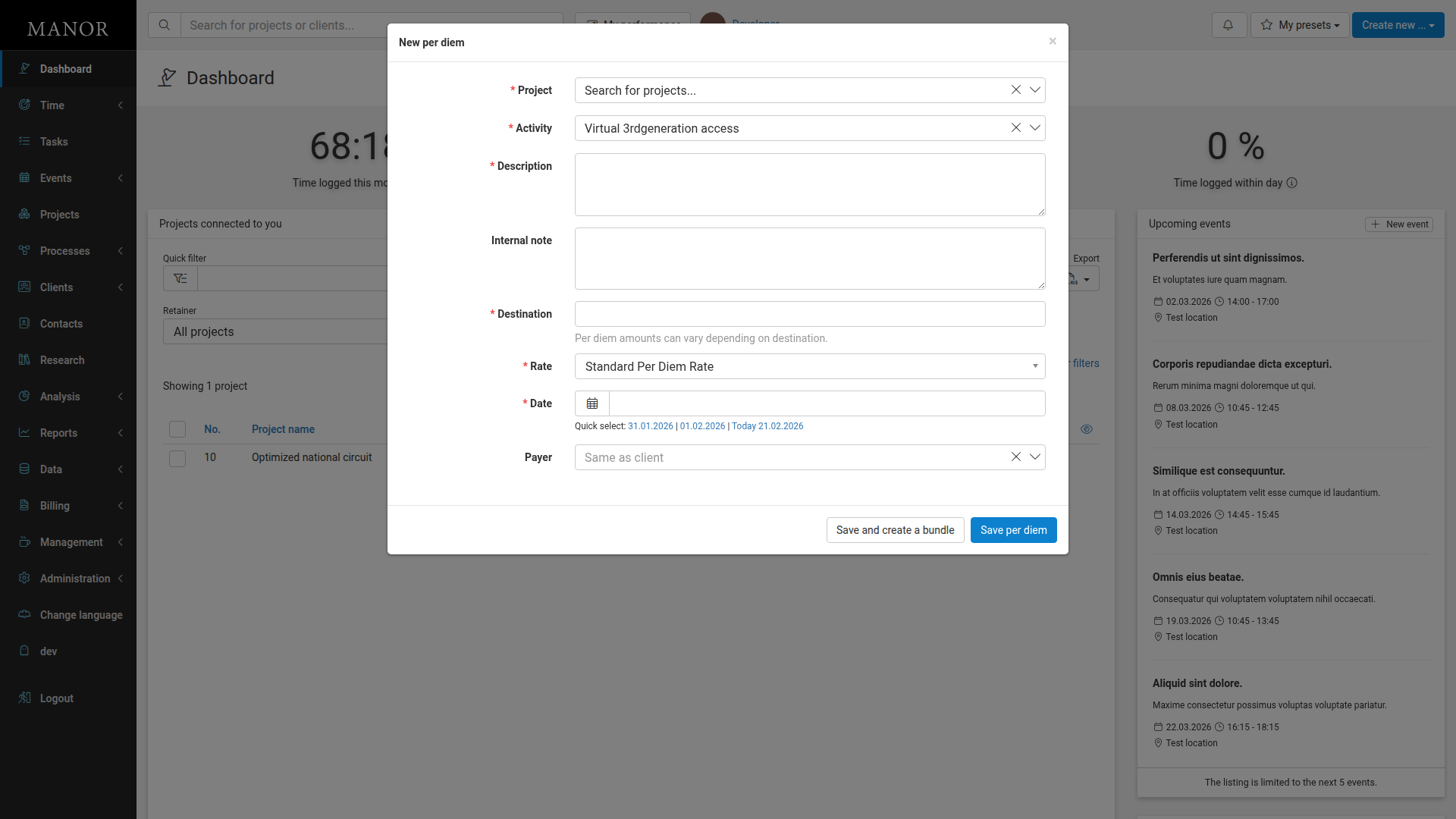
Fill in per diem details:
Required Fields:
- Project: The project this per diem applies to
- Activity: Which activity this relates to (auto-selected from your current project)
- Description: Purpose of the travel (e.g., "Conference in New York")
- Destination: Where the travel occurred (e.g., "Lake Adrain")
- Rate: Daily allowance amount - select from pre-defined rates like "Standard Per Diem Rate"
- Date: When the per diem applies
Optional Fields:
- Internal Note: Additional context
- Payer: Who pays for the per diem (defaults to "Same as client")
-
Click Save per diem.
What You Can Do with Per Diem
Track Daily Allowances
Record standard per-day amounts for meals and lodging.
Bill Travel Costs
Charge per diem amounts to appropriate clients.
Apply Different Rates
Use customized rates based on destination.
Important Per Diem Fields
Project The project this per diem is associated with. Required field.
Activity Which activity within the project this per diem relates to. Helps with detailed cost tracking.
Description Purpose or context for the travel (e.g., "Conference in New York"). Required field.
Destination Where the travel occurred (e.g., "Lake Adrain"). Different locations may have different rates. Required field.
Rate Daily allowance amount. Select from pre-defined rates like "Standard Per Diem Rate" or other configured rates. Required field.
Date When the per diem applies. Each day of travel needs its own entry. Uses quick-select options for convenient date entry.
Payer Who covers the per diem cost. Defaults to "Same as client" but can be changed to other payers.
Finding and Managing Per Diem
Viewing Per Diem Entries
Find entries on the project page under the Per Diems section. All per diem entries for the project are listed with their destination, date, and amount.
Editing Entries
- Click Edit on the per diem entry
- Update details as needed
- Click Save per diem
Deleting Entries
- Click Edit on the per diem entry
- Click the Delete button
- Confirm the deletion
Important: All per diem deletions are audited for security and compliance purposes.
Using Per Diem Data
Track Travel Costs
Per diem entries appear in the project's Unbilled section, allowing you to see total travel costs alongside other billables like time and expenses.
Include in Client Invoicing
Per diem amounts can be included on invoices to charge clients for travel allowances. They appear as a separate line item showing the daily rates and number of days.
Monitor Budget Impact
Review per diem costs as part of project profitability analysis to ensure travel is cost-effective for the engagement.
Best Practices
Enter for Each Travel Day Create separate entries for each day of multi-day travel. This provides detailed tracking and makes it easy to adjust specific days if needed.
Use Appropriate Rates Apply rates that match company policy and destination. Pre-defined rates like "Standard Per Diem Rate" ensure consistency across projects.
Mark Destination Accurately Use clear destination names so you can easily review where travel occurred and apply the correct rates for different locations.
Link to Activities Associate per diems with specific activities when possible to track costs by work type and activity.