
Global search allows you to quickly locate projects and clients from anywhere within Manor. By typing keywords into the top navigation search field, you can immediately find open projects and active clients and navigate directly to their pages.
Accessing Global Search
The global search field sits at the left of the top navigation bar.

You can activate and use global search in several ways:
- Direct click: Click the field labeled Search for projects or clients... in the top navigation bar.
- Keyboard shortcut: Press
Alt + S(on Windows/Linux) orControl + Option + S(on macOS) to focus the search field from any page. This is a browser access key, so the exact combination can vary slightly between browsers. - Submit: Type your query and press
Enterto open the full results page. The magnifying-glass icon inside the header field is decorative and does not submit the search — useEnter, or the Search button on the results page.
As you type, Manor shows an instant suggestion list below the field. The list matches projects, clients, and retainers, with an icon showing each result's type (a cube for projects, a person for clients, and a group for retainers). If nothing matches, the list reads Nothing found. When your firm stores files in Box and your account is connected to it, the list also ends with the link Click here to search within files.
What Can Be Searched
Global search covers the two core operational records, plus retainers in the instant suggestions.
Projects
Searching matches open projects that your user account is permitted to view. Manor looks at:
- Project name: Partial matches anywhere in the full project name.
- Project number (ID): The project's number, which is also shown in parentheses after the project name, so typing all or part of that number finds the project. When the query is a plain number, projects whose number matches exactly — or begins with it — are ranked to the top of the results.
- Buyer reference number: Matches the beginning of the number.
- External identifier: Matches the beginning of the identifier code, when external identifiers are enabled for your firm.
- Activity names: The instant suggestions in the header can also match the names of a project's activities and show the matching activity beneath the project name.
Note: Global search lists open projects only. Closed or archived projects do not appear; to locate them, use the filter controls on the Projects page.
Clients
If your account is permitted to view clients, Manor searches the client directory using:
- Client name: Matches anywhere within the company or individual name.
- Client number / ID: Matches the beginning of the client's number.
- Email address: Matches partial strings in the client's invoice delivery email.
- Phone number: Matches partial strings in the client's phone number.
- National ID (SSN / kennitala): Matches when you enter at least four digits or dashes (for example
9139or913975-9372).
Retainers
The instant suggestions in the header also include retainers you are permitted to view, matched on the retainer name and buyer reference number. Selecting a retainer opens it in a dialog rather than navigating to a page. Retainers do not appear on the full search results page.
Search Results and Navigation
Submitting a search opens the dedicated search results page (/search?search-string=...).

The results page has:
- Search text: A search field at the top, labeled Search text, lets you refine or enter a new query without returning to the header. Press the Search button to run it.
- Projects (left column): Matching projects, each shown as its full name with the project number in parentheses — for example
Acme Corporation - Patent Application (1). Clicking a project opens it (/matter/{id}). - Clients (right column): Matching clients, shown with their currency and, when set, their national ID — for example
Acme Corporation (ISK) (123456-7890). Clicking a client opens its profile (/client/{id}). - No results: If nothing matches, Manor displays The search returned no results.
Searching by Project Number
Because a project's number (its ID) is part of its name, searching by number is a fast way to jump straight to a project you already know.
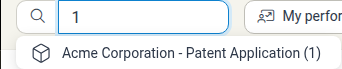
- Type the project number (or part of it) into the header field to see matching projects in the instant suggestions.
- Press
Enterto open the full results page, where projects matching the number are listed under Projects and ranked first.
Things to keep in mind:
- Numbers are ranked, not exclusive: A number query returns every project whose name contains that number, as well as projects whose number matches it, with exact and prefix number matches ranked to the top. A plain number usually brings the target project first, but other projects can still appear.
- Project number vs. client number: The project number (ID) is not the same as the client number. Client numbers are searched separately under Clients.
- Open projects only: As with all global search, closed projects are not included.
Cloud File Search
When Box cloud storage is enabled for your firm and connected to your account, Manor can also search files across project folders. Choosing Click here to search within files. from the header suggestions opens the file search page (/search/files), where matching documents show their folder path and open the relevant project folder or an embedded preview.
Tips for Effective Searching
- Search by number: Quickly find clients or projects by typing part of the client number, the project number (the ID shown after the project name), or the buyer reference number.
- Case-insensitive: Searches in Manor are case-insensitive, so
acme,Acme, andACMEreturn the same results. - Combine with filters: For granular filtering within a module (such as by tags, owners, date ranges, or billing status), use the Quick filter and advanced filter controls on the Projects, Clients, or Time list pages.
- Use keyboard shortcuts: Press
Alt + Sto jump to the search field without leaving the keyboard, and press?anywhere to open Manor's keyboard shortcut dialog.
See Also
- Keyboard Shortcuts — Complete guide to keyboard shortcuts in Manor
- Quick Create — Create projects, clients, and time entries rapidly from any screen
- Dashboard — Overview of your daily targets and active projects
- Projects — Managing and organizing projects