
The Billable ratio report shows what percentage of your logged time is billable to clients versus internal or non-billable work. In Manor, the billing percentage metric is calculated as the sum of all billable hours divided by the sum of all logged hours (and can be greater than 100% if billable hours exceed logged duration).
This report helps firm leadership and managers understand how efficiently team capacity is converted into revenue-generating client work.
Accessing the Report
- Click Reports in the main navigation menu.
- Under Reports, select Billable ratio (URL:
/report/billing-percentage). - By default, the report loads data for the current year. You can change the year using the year dropdown filter in the top filter bar.
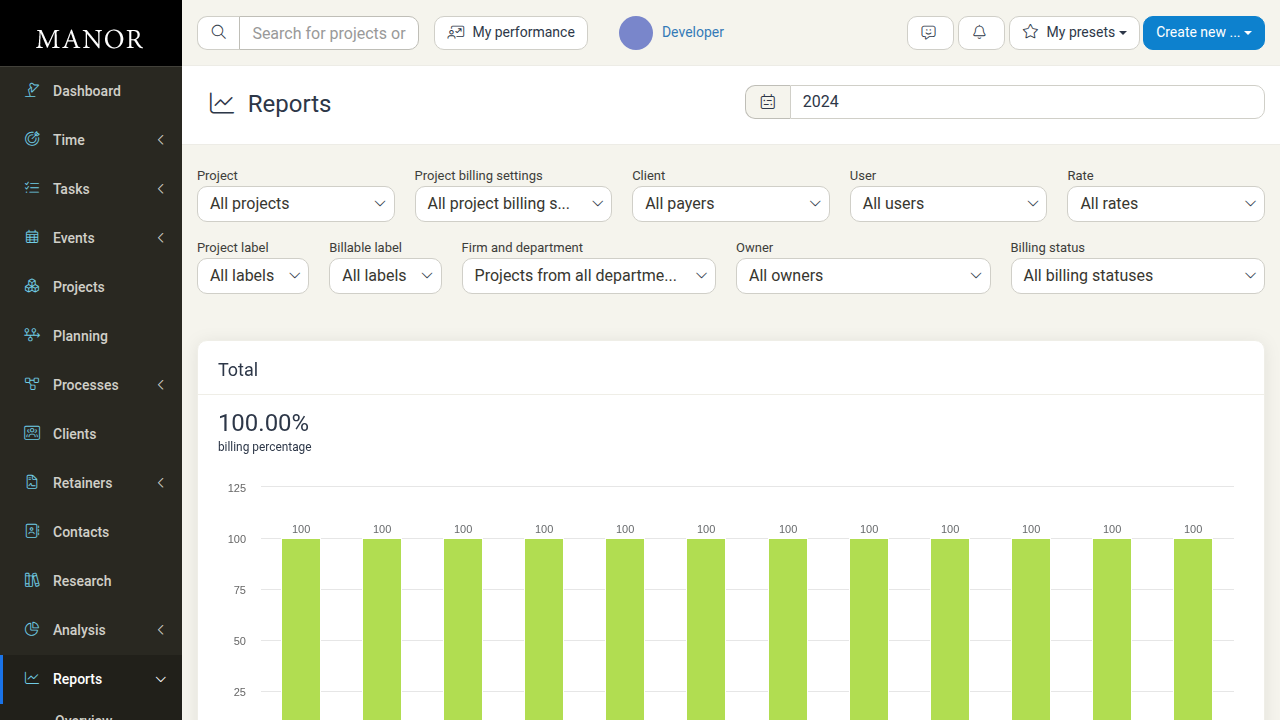
Total Metric and Trend Chart
At the top of the report:
- Total billing percentage — Displayed as a prominent percentage (e.g.,
100.00% billing percentage). - Interactive trend chart — Visual bar chart showing the ratio over time.
- Time resolution selector — Switch the chart time buckets between:
- Days
- Weeks
- Months (default)
- Years
Hovering over any period in the chart displays the exact percentage for that timeframe.
Report Breakdowns
Beneath the primary metric chart, Manor organizes billable ratios into detailed category tables, each equipped with visual progress bars:
1. Billing Percentage by Project
Lists projects ordered by billing ratio. Clicking a project name drills down to that project's filtered report, while the external link icon jumps directly to the project's dashboard.
2. Billing Percentage by Client
Displays the billable ratio for each client, showing their national ID and linking directly to client pages or filtered reports.
3. Billing Percentage by Employee
Breaks down the percentage of billable hours per team member, allowing managers to identify team members who might be burdened with administrative or internal tasks.
4. Billing Percentage by Rate
Compares billing percentages across various billing rate categories configured in your pricing setup.
5. Billing Percentage by Label
Shows billable ratios grouped by matter and billable labels, helping you evaluate profitability by work classification or specialty area.
6. Billing Percentage by Project Owner's Department
Aggregates billable performance by organizational units and departments to benchmark team performance.
7. Billing Percentage by Project Owner
Breaks down billing performance by the project owner/responsible manager.
Filters
The report includes a comprehensive filter bar at the top:
- Year / Period — Quick selector for specific years (e.g., 2026, 2025, 2024), All time, Past, or Future.
- Project — Filter by all projects or a specific project.
- Project billing settings — Filter by billing configuration (e.g., all settings, standard, retainer).
- Client — Filter by payer/client.
- User — Filter by specific employee or all users.
- Rate — Filter by specific rate categories.
- Project label — Filter by labels assigned to projects.
- Billable label — Filter by labels assigned to individual billable entries.
- Firm and department — Filter by specific organizational departments or firms.
- Owner — Filter by project owner.
- Billing status — Filter by billing status (all, billed, unbilled, written off).
Interpreting the Billable Ratio
- High Ratio (80%+): Most logged effort is directly billable to clients. Indicates high utilization and healthy revenue generation.
- Medium Ratio (60%–80%): Balanced workload between billable client delivery and internal tasks, business development, or training.
- Low Ratio (<60%): Significant portion of time spent on administrative overhead, non-billable internal matters, or written-off hours. Worth investigating whether non-billable burdens can be streamlined.
- Ratio Over 100%: Occurs when billable hours assigned to entries exceed the actual elapsed clock duration (e.g., agreed value billing or minimum increments).
Best Practices
- Review monthly trends: Check the monthly chart regularly to catch drop-offs in billable ratio before they impact billing cycles.
- Differentiate project types: Use the Project billing settings and Project label filters to separate internal firm development and pro-bono work from commercial client projects.
- Balance team workloads: Identify employees with low billable percentages to evaluate whether administrative tasks need rebalancing across support staff.
- Cross-reference with Write-off report: If billable ratios are lower than expected, review the Write-off report (
/report/write-off) to see where hours are being discounted or written down.
Related Reports
- Billing percentage — Shows what percentage of billable hours have actually been invoiced.
- Hours — Total hours logged broken down across dimensions.
- Revenue — Total accrued revenue generated from billable work.
- Write-off — Analysis of hours and revenue written off.