
What is the External Project Number?
Every project in Manor already has its own automatic Project number — a sequential, unchangeable integer. On top of that, Manor can show an optional External project number field: a free-text box where you record another number for the project.
Typical uses include:
- A number from an older or parallel case-management system, so you can reconcile the two.
- A physical document box or archive reference.
- A case or matter number from an authority, court or registry.
The field is free text, so it can hold letters, digits and separators (for example 22-001, BOX-00231 or 2026/4481). It is completely separate from Manor's automatic project number and never changes how that number is generated. For how Manor numbers projects and arranges its own series, see Project Number Series.
Enabling the External Project Number Field
The field is switched on once for the whole instance. It is an administrator task and requires the Can manage settings. permission.
-
Go to Management → Settings.
-
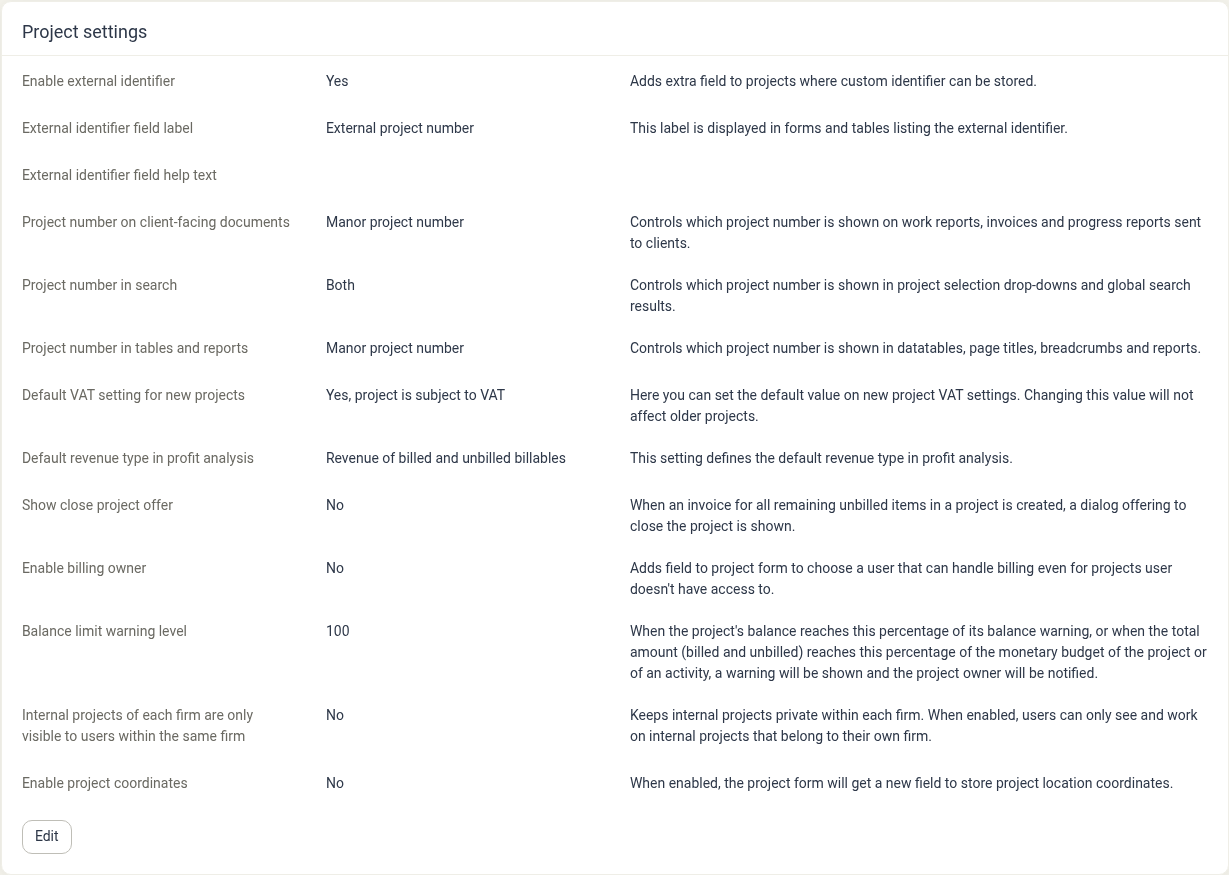
Find the Project settings card and click Edit.
-
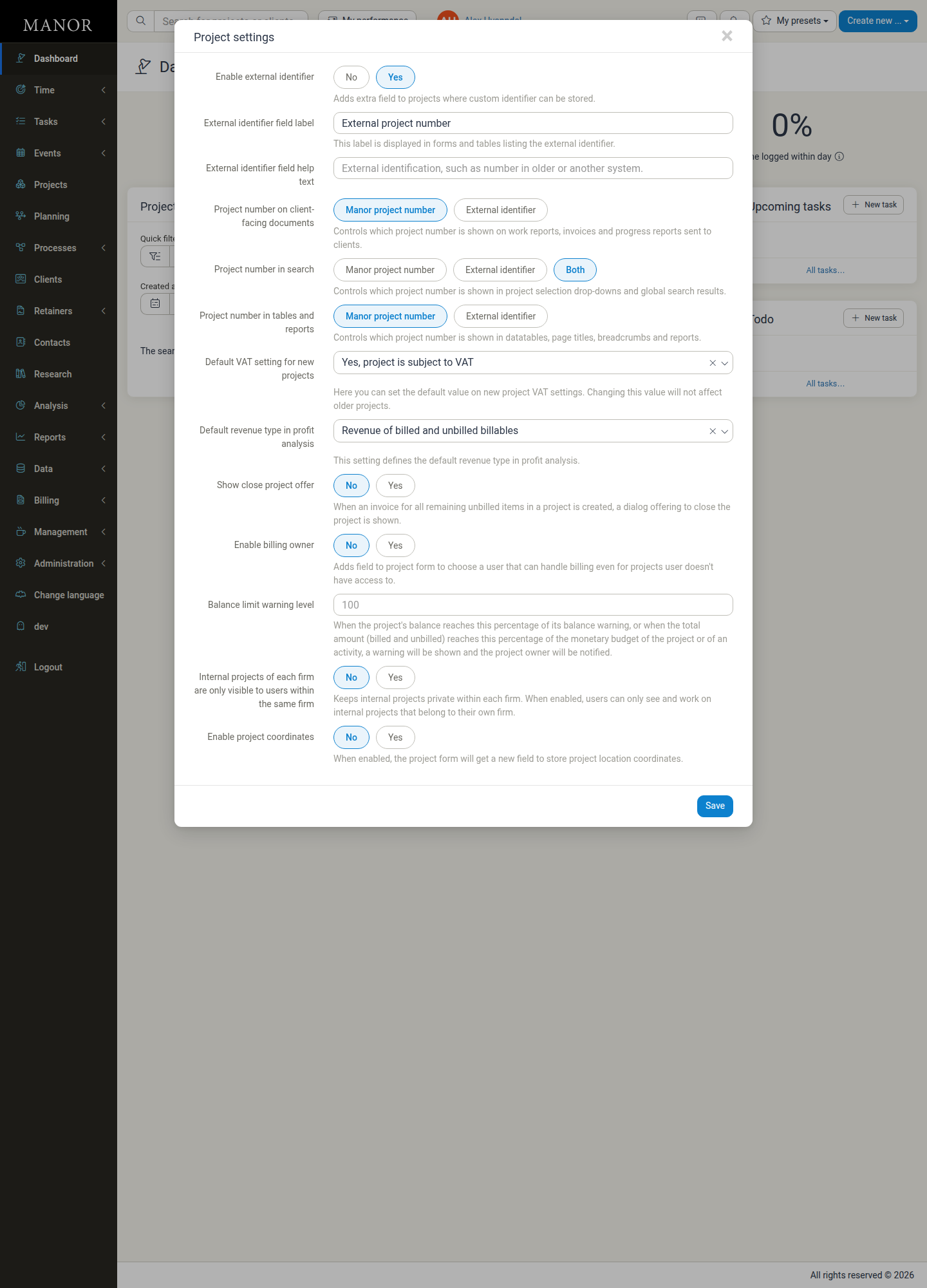
In the Project settings dialog, set Enable external identifier to Yes. The identifier fields and the project-number options appear.
-
In External identifier field label, type the name the field should carry. For example, External project number.
-
In External identifier field help text, optionally type the helper text shown under the field on the project form. If you leave it empty, Manor uses its own default helper text.
-
Click Save.
Note: The setting itself is called external identifier. Once you rename it with the field label, the field and its columns are shown everywhere under your chosen name. If you leave the label empty, Manor falls back to the default label External identifier.
The label is a firm-wide setting, so the field only ever has one name across the whole instance. Changing the label later updates the field everywhere immediately, including any columns you have configured.
Where the Field Appears
Once the setting is on, the field and its value show up in several places.
On a Project
The field is available on the project form, in the Properties area of Advanced project properties, both when you create a project and when you edit one.

Its helper text reads: "External identification, such as number in older or another system."
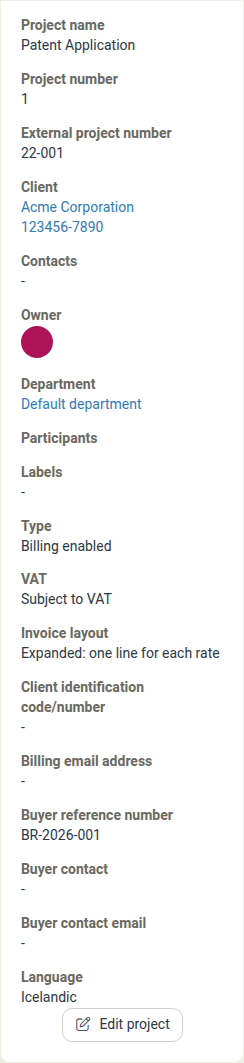
The value is also shown on the project's detail page, in the Project properties panel, directly below Project number.
In Lists and Tables
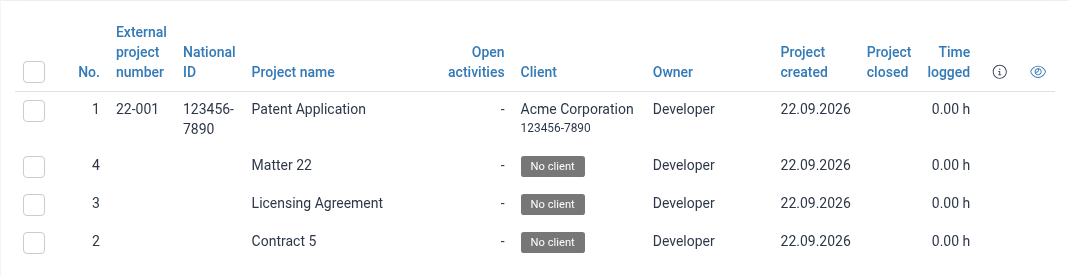
When the setting is on, a column carrying your label is added to the project lists:
-
The Projects portfolio list, where the column sits next to No. and is sortable.

-
The Data → Projects view, which also shows it as a sortable column.
-
The Projects connected to you table on the Dashboard.
The column is added for every project, and stays blank until you fill the field in.
In Search
The value is searchable, so you can find a project by its external number:
- The Quick filter on the Projects list matches the external number.
- Global Search (the header search field) matches the external number, in addition to the project name, project number and buyer reference number.
Search matches the start of the external number: typing 22-001 finds the project, as does typing a leading part of it such as 22-0. A fragment from the middle or end of the value does not match.

Note: Global Search lists open projects only. Closed projects are not returned by Global Search; filter the Projects list instead.
Who Can Edit the External Project Number
The field is edited as part of the project, so it uses the same permissions as editing a project:
- Can edit projects. — can edit the external number on any project they have access to.
- Can edit projects as participant (full access participant). — can edit it on projects where they are the owner or have full access.
Anyone who can edit the project can change the external number; there is no separate permission for it. Changing the value is recorded in the project's log, like other project edits.
Clearing the Field
The external number can be added or changed, but it cannot be cleared through the project form: if you empty the field and save, Manor keeps the value it already had. To remove or correct an existing external number, contact Manor so the value can be adjusted for you.
How It Relates to the Project Number and Billing
- The automatic project number is Manor's own identifier. It drives the No. column and is assigned on creation and never edited.
- The External project number is an optional, free-text reference you maintain alongside it. The two are independent: a project always has an automatic number, whether or not it has an external one.
- The external number has no effect on what is billed, how entries are priced or how projects are numbered. Fields such as Buyer reference number and Client identification code/number are the ones intended to carry the client's own references on invoices.
In the same Project settings group, three further settings decide whether Manor displays the automatic project number or the external number in the interface and on documents sent to clients:
| Setting | Controls | Options |
|---|---|---|
| Project number on client-facing documents | Which number is shown on work reports, invoices and progress reports sent to clients | Manor project number, External identifier |
| Project number in search | Which number is shown in project selection drop-downs and global search results | Manor project number, External identifier, Both |
| Project number in tables and reports | Which number is shown in data tables, page titles, breadcrumbs and reports | Manor project number, External identifier |
If any of these is set to External identifier, the external number takes the place of the automatic number in that context — including on client-facing documents. By default they show the Manor project number (and Both in search). These settings change which number is displayed; they do not change what the external number can be used for.
| Behaviour | Automatic Project number | External project number |
|---|---|---|
| Who creates it | Manor, automatically | A user, manually |
| Can it be changed? | No | Yes (added or changed) |
| Can it be cleared? | No | Not through the project form |
| Format | Plain sequential integer | Free text (letters, digits, separators) |
| Shown on client-facing documents? | Yes, unless Project number on client-facing documents is set to External identifier | Only if Project number on client-facing documents is set to External identifier |
| Searchable? | Yes | Yes (start of the value) |
| Used to match imports? | Yes (Matter ID) | No |
Tip: Because the external number is just a reference, choose a convention and stick to it, so the same kind of reference always goes in the same field. If you need to categorise or report on projects, labels and custom fields are usually a better fit than encoding the meaning into a number.
Related Articles
- Project Number Series — How Manor numbers projects, and how to arrange your own series.
- Project Creation — Creating a project, including the Advanced project properties where the field appears.
- Projects — The portfolio list, including its columns, sorting and filters.
- Projects (Data) — The firm-wide data view and export of project records.
- Global Search — Finding projects and clients from anywhere.
- Global Settings — Where the Project settings group lives.