
The Management section provides tools for configuring your Manor instance, managing organizational structure, setting up pricing strategies, and maintaining system-wide settings. It's designed for administrators and managers who need to control how the system operates.
Management Overview
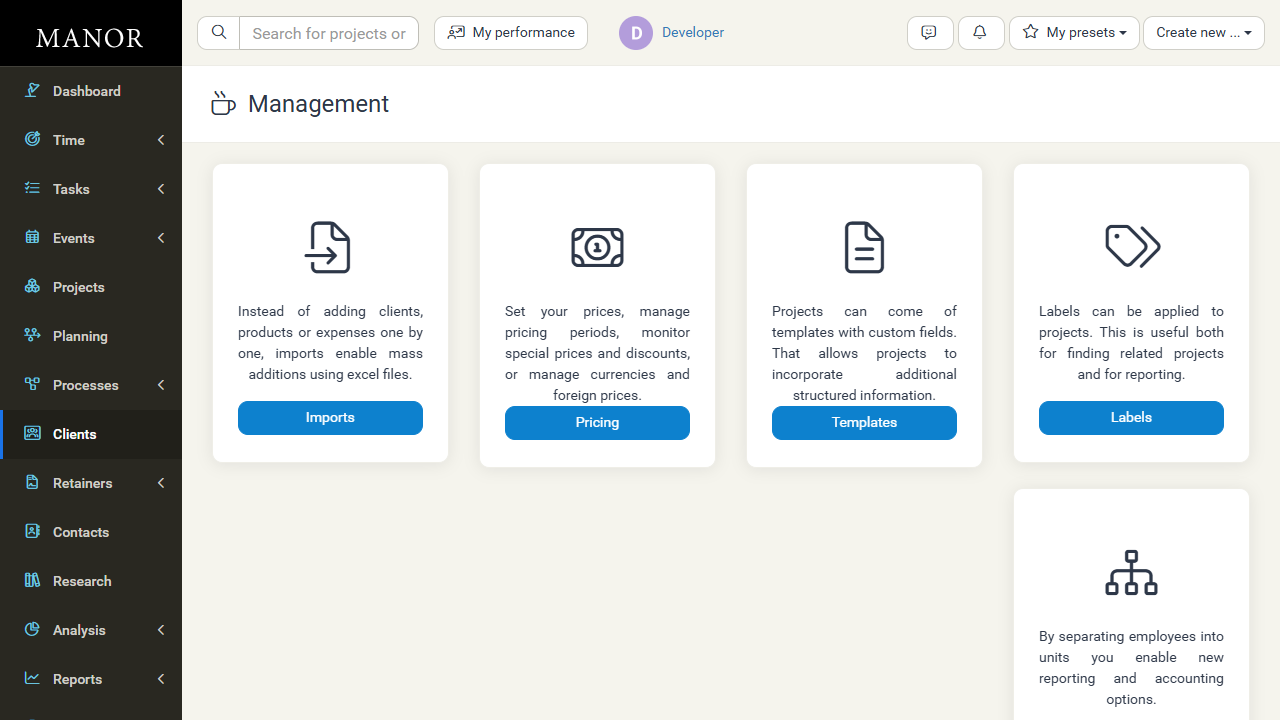
The Management section includes the following key areas:
Imports
Add large numbers of clients, time entries, expenses, products, and tasks at once using spreadsheet files instead of entering them one by one. This is essential for quickly populating your system with existing data.
Note that projects themselves are not imported: they must exist first, because the entries in an import are matched to projects by their project ID.
Learn more: See Imports for the columns each import accepts, validation and duplicate handling, and how to prepare the projects your entries refer to.
Pricing
Manage pricing setup and execution. This includes setting up price lists, managing pricing periods, configuring discount structures, monitoring special prices, handling framework agreements, and managing currencies for international work.
Templates
Create reusable project templates with custom fields. Templates help standardize how projects are set up and allow you to capture additional structured information specific to your organization's needs.
Labels
Apply labels to projects for better organization and reporting. Labels help you categorize projects, making them easier to find and enabling new analysis and reporting options.
Hierarchy (Organizational Structure)
Organize employees into departments and units. This separation enables new reporting options, helps with accounting practices, and makes it clear who belongs to which part of your organization.
Locations
Assign employees to physical or virtual locations. This helps with location-based reporting and analysis, and is useful for organizations with multiple offices or remote workers.
Levels
Set up organizational levels to reflect your company's structure and hierarchy. Users can be assigned to levels for improved reporting and organizational clarity.
Qualifications
Manage employee skills, certifications, and abilities. Track what your team members are qualified to do, useful for assigning work appropriately and managing staffing.
VAT Rates
Configure value-added tax (VAT) rates for expenses. Different expense types and regions may have different tax rates, and this allows you to set them up correctly.
Settings
Manage global system-wide settings that apply to your entire Manor instance. This is where you configure core system behavior including billing preferences, date/time formats, and feature toggles.
Firms
Manage firm-specific settings including company address, logo, invoicing setup, bank accounts, and other organization-specific configuration.
When to Use Management
You'll use the Management section when you need to:
- Set up pricing — Create pricing structures, discounts, and special rates
- Configure the system — Update global settings and firm information
- Organize teams — Set up departments, locations, and reporting hierarchies
- Import data — Bulk-load clients, time entries, expenses, products, and tasks
- Manage templates — Create standardized project setups
- Track qualifications — Record skills and certifications
- Set tax rates — Configure VAT and other tax information
Who Uses Management?
Typically, system administrators and finance managers use the Management section. Users may access specific areas (like viewing templates) but cannot usually change management settings without appropriate permissions.
Related Topics
- For bulk-loading data from Excel, see the Imports documentation
- For pricing-specific tasks, see the Pricing Management documentation
- For firm and company setup, see the Firms documentation
- For employee organization, see the Departments documentation
- For workflow configuration, see the Processes documentation