
Introduction
The Pricing section in Manor serves as your central control center for managing all billing rates, price structures, client agreements, and cost tracking. By properly defining prices and rates, you ensure that time, travel, products, and per diems logged across your firm are accurately priced, properly billed, and analyzed for profitability.
Configuring pricing in Manor enables you to:
- Establish standard baseline rates for hourly labor, travel, products, and allowances.
- Organize rates logically with rate categories.
- Automate scheduled rate adjustments using pricing periods without rewriting past entries.
- Set up framework agreements for clients requiring pre-negotiated contracts and authorized staff rates.
- Record internal cost prices to evaluate gross margins and project profitability.
- Monitor active currencies and configure multi-currency conversions.
- Track price modifications and overrides across clients, projects, and activities through price monitoring.
Accessing Pricing
To access the Pricing area:
- Navigate to Management in the main sidebar menu.
- Select Pricing (or go to
Management > Pricing).
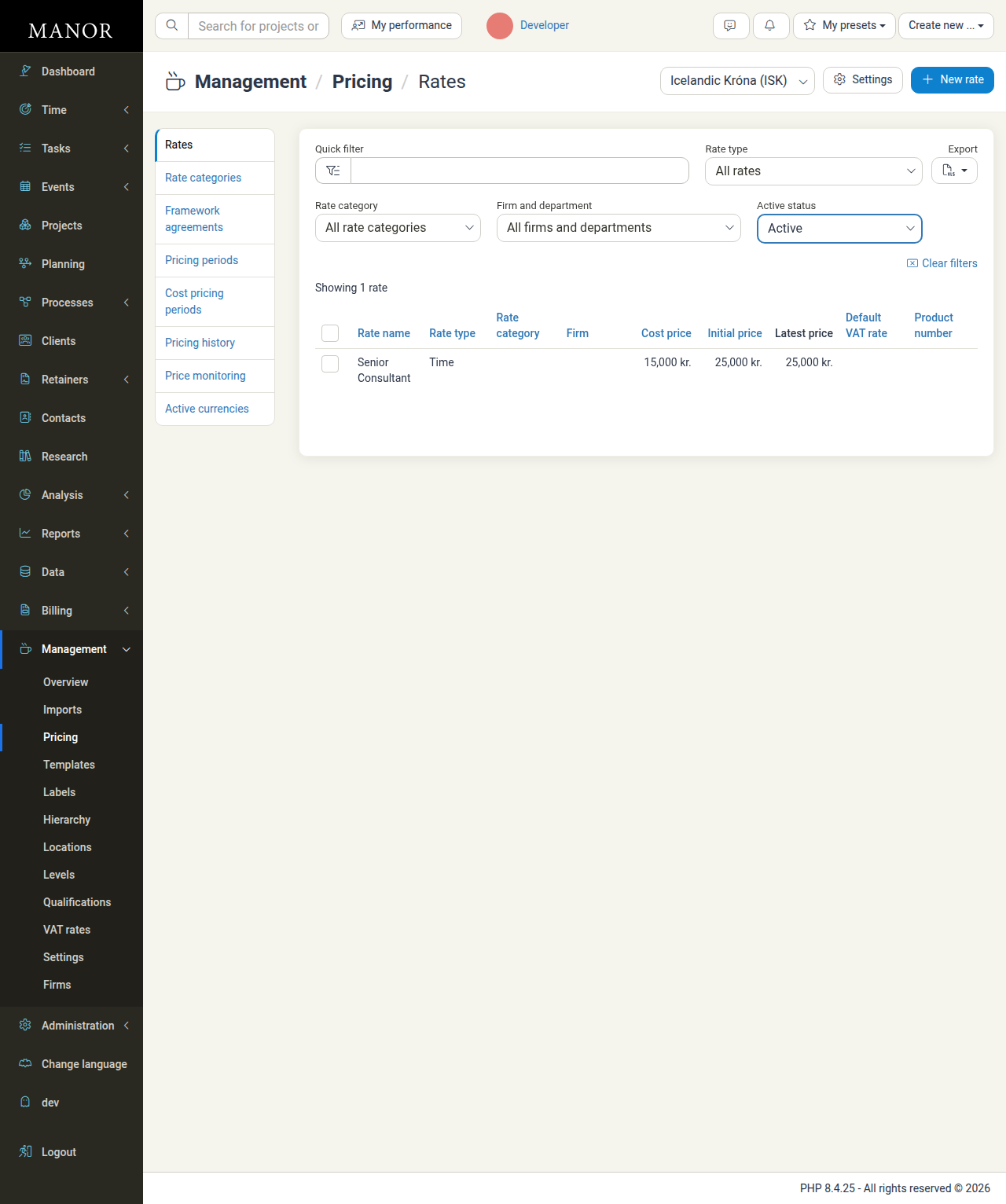
You can also reach it from the Pricing card on the Management overview page. The Pricing area opens on its first page, Rates.
From the Pricing view, you can access the core pricing components via the Pricing menu on the left of the page:
- Rates — Manage all standard billable rates, baseline prices, and accounting product codes.
- Rate categories — Create organizational groups to categorize rates for clean filtering and reporting.
- Framework agreements — Define long-term umbrella contracts with standard rates and assigned staff for specific clients.
- Pricing periods — Schedule future or periodic rate changes effective from a specific start date.
- Cost pricing periods — Define internal cost baselines across pricing periods to track firm expenses and measure true profit.
- Pricing history — View original initial prices for all rates to audit baseline pricing decisions.
- Price monitoring — Track special prices, custom client rates, and project discounts applied across active work.
- Active currencies — Manage enabled currencies, display formatting, decimal precision, and exchange rates.
On the Rates page you can also open the rate settings with the Settings button (next to the currency selector). The settings page holds firm-wide defaults such as the default product numbers used when posting to your accounting system; see Pricing Setup.
Key Concepts and Pricing Hierarchy
Manor calculates the billing price for any billable item using a most specific wins hierarchy:
- Activity Price / Discount — The most specific price or discount assigned directly to a project activity.
- Project Price / Discount — Price overrides or percentage discounts configured at the project level.
- Client Price / Discount — Pre-negotiated prices or percentage discounts configured on the client profile.
- Pricing Period Rate — The scheduled rate active for the date the work was performed.
- Standard Baseline Rate — The rate's default initial price configured in the Rates table.
Tip: If an invoice needs a special adjustment, you can override a billable group's subtotal or discount, or the invoice's total amount, while preparing the invoice without altering your underlying rate definitions.
Pricing Workflow
To establish an effective pricing structure, configure features in the following recommended order:
- Configure Currencies — Verify your firm's default base currency and activate any secondary foreign currencies under Active currencies.
- Define Rate Categories — Create logical service groupings (such as Consulting, Legal, Administration, or Support) under Rate categories.
- Set Up Baseline Rates — Create your firm's standard billable rates for Time, Travel, Product, and Per diem items under Rates, including baseline cost prices and ERP product codes.
- Configure Cost Pricing — Maintain internal cost baselines under Cost pricing periods to ensure reports reflect accurate margins.
- Schedule Pricing Periods — When announcing periodic rate revisions, create dated entries under Pricing periods so work logged on or after that date automatically reflects updated pricing.
- Set Up Framework Agreements — For clients with contracted rate schedules, create a framework agreement and link authorized rates and projects under Framework agreements.
- Monitor Overrides and Discounts — Regularly inspect Price monitoring to audit client and project discounts, verifying that effective billed amounts align with commercial expectations.
Related Documentation
For step-by-step guides on configuring each pricing tool, explore the related articles:
- Rates — Creating, editing, and deactivating billable rates and rate settings.
- Rate Categories — Grouping rates into organizational categories.
- Pricing Periods — Scheduling effective date-based rate changes.
- Framework Agreements — Setting up client contracts and authorized project rates.
- Discounts — Applying percentage and fixed discounts across clients, projects, and activities.
- Cost Prices — Setting internal rate costs for profitability analysis.
- Cost Pricing Periods — Updating internal cost prices across scheduled periods.
- Pricing History — Reviewing initial baseline rates for auditing.
- Price Monitoring — Tracking special client pricing and effective prices.
- Currencies — Managing multi-currency setups, decimal formatting, and exchange rates.
- Active Currencies — Enabling currencies and viewing exchange rates on the Active currencies page.
- Understanding Prices — In-depth guide to price resolution and overriding prices across Manor.