
What are Per Diems?
Per diems are fixed daily living allowances paid to employees to cover food, lodging, and incidental costs incurred during project-related business travel. Unlike receipt-based expenses, per diems use standardized daily allowance rates.
Individual per diems are logged in the context of a project. The Per diems page in the Data section gives a firm-wide view of every per diem entry in Manor, across all projects and users. Use it to review, filter, export, and bulk-edit per diem records. To record a new per diem on a project, see Per Diem.
Accessing Per Diems
To open the firm-wide per diem list:
- Click Data in the main navigation menu.
- Select Per diems in the Data submenu (or click the Per diems card on the Data overview page).
- Alternatively, navigate directly to
/data/per-diem.
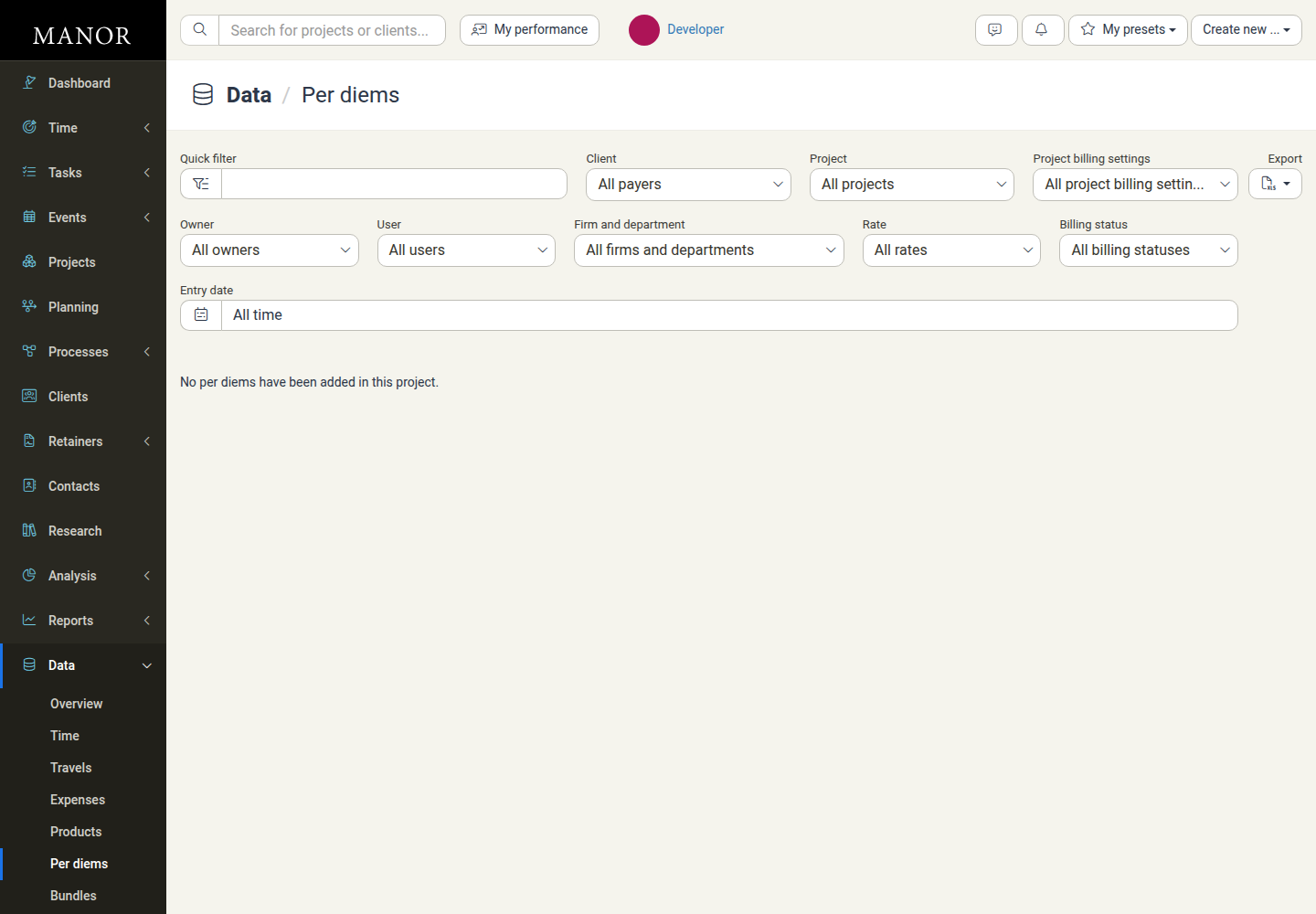
Filtering Per Diems
The filter bar at the top of the table lets you narrow the list by payer, project, person, rate, and billing state:
- Quick filter — Free-text search that narrows the list as you type.
- Client — Filter by payer (defaults to All payers).
- Project — Narrow the list to a single project (defaults to All projects).
- Project billing settings — Filter by how the project is set up for billing (defaults to All project billing settings).
- Owner — Filter by the owner of the project.
- User — Filter by the employee who received or logged the per diem.
- Firm and department — Filter by firm or organizational unit (defaults to All firms and departments).
- Rate — Filter by the applied per diem rate (defaults to All rates).
- Billing status — Filter by billing stage. Options are All billing statuses, Billed, Unbilled, Billed and unbilled, Written off, Main billables, Settlement billables, and On a proposal.
- Entry date — Filter by date. Choose a preset such as All time, Today, Yesterday, Tomorrow, a past or future range, an individual month, Last 3 months / Next 3 months, Last 12 months / Next 12 months, or a specific year, then click Apply. Use Cancel to discard the date selection.
Click Clear filters to reset every filter back to its default. Filters work together, so you can combine several at once to narrow the list.
Note Some filters only appear when they are relevant. For example, Label appears once billable labels have been configured, and an invoice-number filter appears when the list is scoped to a single project that has invoices.
Columns in the Per Diem Table
The table lists the following columns:
| Column | Description |
|---|---|
| Date | The date the daily allowance applies to |
| User | The employee who received or logged the per diem |
| Unit | The organizational department of the project owner |
| Location | The office location of the project owner |
| Payer | The client being billed for the allowance |
| Project | The project the per diem is charged to |
| Activity | The project activity the per diem relates to, when activities are in use |
| Description | Description of the travel or purpose of the allowance |
| Rate | The per diem rate applied to the entry |
| Destination | The location where the travel took place |
| Unit price | The daily amount per unit for the applied rate |
| Total | The total per diem amount before discounts |
| Discount | Any discount applied to the entry |
| Effective price | The final per diem amount after discounts |
| Invoice | The billing status, or the linked invoice when the entry has been invoiced |
Rows are ordered by date, newest first. Click a column header to sort by that column, and click again to reverse the sort order.
Note The Unit price, Total, Discount, and Effective price columns are only shown to users who are allowed to view amounts.
Editing and Bulk Actions
- Editing — Click a per diem row to open its edit dialog, change the values, and save. See Editing Records for how editing and defaults work.
- Bulk actions — Tick the checkboxes next to the rows you want, then use the selection bar that appears above the table. On the Per diems list the available actions are Delete, Move, Copy, Change rate, Change payer, Write-off, Undo write-off, Edit selected items, and Change user. See Copying and Moving Entries Between Projects for what each action does and the permissions they require. While rows are selected, a Calculated totals row also appears directly beneath the action buttons, summing the Total and Effective price of the selection inline; columns without a value show an em dash (
—).
Note Move and Copy only work on unbilled entries. Per diems that have already been invoiced are skipped, and Manor reports how many entries were processed and how many were left out. Per diems that have been written off are shown dimmed and are not editable until the write-off is undone.
Exporting Per Diems
Click Export at the end of the filter bar and choose Download as Excel spreadsheet to download the currently filtered per diem list as an Excel file. Apply your filters first, so the file contains only the per diems you need.
Best Practices
- Audit against travel logs — Verify that per diem entries correspond to the travels logged for the same dates and employees.
- Review billing status before invoicing — Filter by Billing status: Unbilled regularly to confirm that all billable allowances are captured in client billing.
- Keep rates and destinations consistent — Use consistent rate categories per destination tier so audits are simple and client billing stays correct.
See Also
- Data Management — Hub for all data tables in Manor
- Per Diem — How to create and edit individual per diem entries on projects
- Travels — Firm-wide list of travel entries in the Data section
- Expenses (Data) — Firm-wide list of expense entries in the Data section
- Billables — Unified view of all billable items across time, travel, expenses, products, and per diems
- Copying and Moving Entries Between Projects — All bulk actions available on the per diem list
- Editing Records — How to open, change, and save records