
What are Products?
Products are items you sell to clients, either as physical goods or services. They are managed in a product catalog and added to projects and invoices. Products help you track revenue from item sales separate from time-based billing.
Products vs. time entries — the key difference is the unit. A product record is measured in pieces (pcs), whereas a time record (time entry) is measured in hours. This is the fundamental distinction between the two: products count how many items or units you deliver, while time entries count how many hours you work.
When to use Products: If your price list should include a product or service that carries a fixed fee rather than an hourly rate, products are the way to go. In other words, use Products when you want to bill a fixed-fee item or service at a per-piece price instead of billing hourly time.
Why Products Matter
Using products helps you:
- Track item sales - Record revenue from physical goods and services
- Streamline invoicing - Add products to invoices quickly with standardized rates
- Analyze revenue - See which products generate the most income
- Separate from time-based billing - Track product revenue independently from hourly work, because products are billed per piece (pcs) at a fixed price rather than per hour
Creating a Product Entry
To add a product to a project:
-
Navigate to the project where you want to add the product.
-
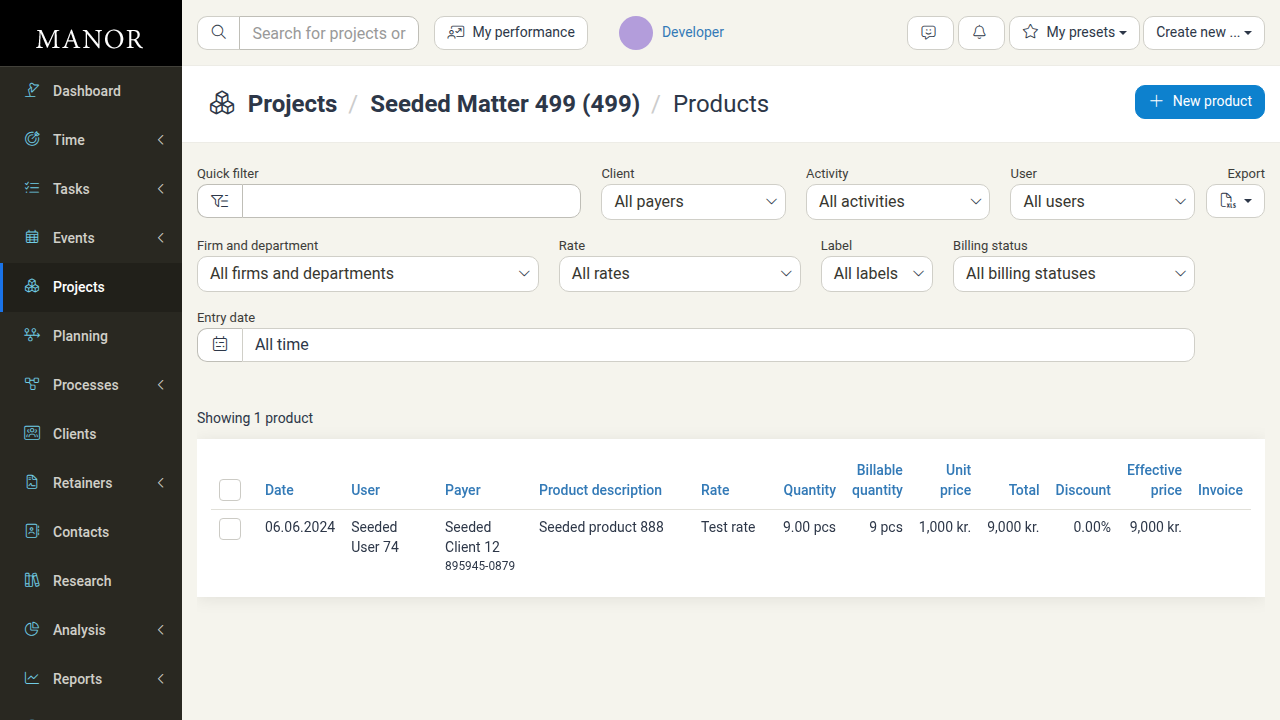
In the project's billables section, click the Products link to view the products list.
-
Click the New product button.
-
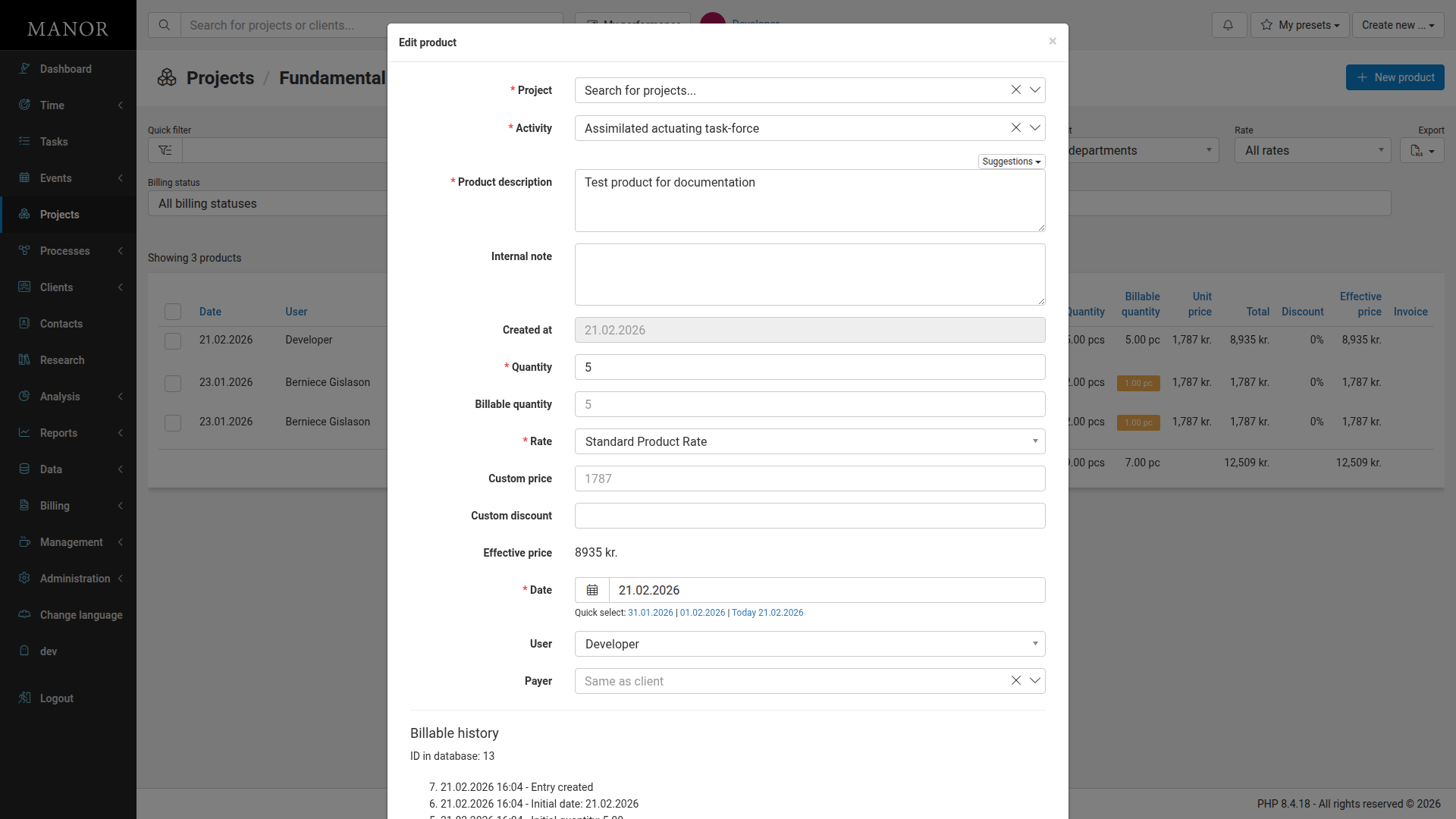
Fill in the product details in the form that appears:
Required Fields:
- Project: The project for this product (pre-filled)
- Activity: Link to a specific activity (pre-filled with the first available activity)
- Product description: Description of the product being sold
- Quantity: Number of units
- Rate: Price per unit (select from available rates)
- Date: Date of the product entry
Optional Fields:
- Internal note: Internal notes about the entry
- Billable quantity: If different from quantity (for partial billing)
- Custom price: Override the standard rate if needed (shows placeholder rate)
- Custom discount: Apply a discount (amount or percentage)
- User: Who logged the entry (defaults to logged-in user)
- Payer: Client to bill (defaults to "Same as client")
-
The Effective price is calculated automatically based on custom price and discount settings.
-
Click Save product to add the product entry to the project.
What You Can Do with Products
Create Product Entries
Add products to projects with descriptions, quantities, rates, and dates.
Link to Activities
Associate product sales with specific project activities for better organization and tracking.
Apply Custom Pricing
Use custom prices or discounts for specific product entries beyond standard rates.
Track Quantities
Monitor how many units of each product are provided and billable.
Important Product Fields
Product description (required) Description of the product being sold. This appears on invoices and in the products list.
Quantity (required) Number of units provided. Multiply by the rate to calculate the total line price.
Rate (required) Price per unit. Select from available rates in your system.
Date (required) Date when the product was provided or sold.
Activity (required) Link to a specific activity within the project for better categorization and tracking.
Billable quantity (optional) If different from the quantity, specify how many units should be billed to the client.
Custom price (optional) Override the standard rate with a custom price per unit if needed.
Custom discount (optional) Apply a discount (amount or percentage) to the product entry.
Effective price (calculated) The final price after any custom prices or discounts are applied.
User Person who logged the product entry. Defaults to the currently logged-in user.
Payer Client to be billed for this product. Defaults to the project client.
Internal note (optional) Internal notes about the product entry (not shown to client).
Finding and Managing Products
Viewing Product Entries
All product entries for a project appear in the Products list with details like quantity, rate, total price, and billing status. You can sort the list by clicking column headers.
Editing a Product Entry
- Click on a product entry in the Products list
- Update the fields as needed (Product description, Quantity, Rate, Date, etc.)
- Click Save product to save your changes
Deleting a Product Entry
- Click on a product entry in the Products list
- Click Delete product
- Confirm the deletion
Using Product Data for Success
Revenue Analysis
Track which products generate the most revenue across projects and activities.
Complete Client Billing
Include product sales on invoices alongside time, expenses, and other billables for comprehensive project billing.
Best Practices
Use Standard Rates Select from standard rates in your system for consistent pricing across projects.
Link to Activities Associate products with activities for detailed project tracking and analysis.
Use Billable Quantity Set the billable quantity separately from the actual quantity if you're not charging for all units provided.
Track Internal Notes Use internal notes to document special circumstances or context about the product entry.
Choose Products for Fixed Fees Use products when an item or service should be billed at a fixed, per-piece price rather than an hourly rate. Reserve time entries for work billed in hours.
Related Articles
- Time Entries — Records of hours worked; unlike products, time entries are measured in hours rather than pieces.
- Billable Types — Overview of all billable types and when to use each one.
- Bundles — Group products together with other billables under a shared price.
- Prices — Configure the rates used for products and other billables.